how to setup your gaming desk
-
 Loading...
 - Valentino Alvarez
- 10 May 2023
- 72 Views
- 0 Like
- 0 Comment
Are you a gaming enthusiast and looking for the perfect gaming desk setup? If yes, then you have come to the right place. Setting up a gaming desk can be overwhelming, especially when you have numerous options available in the market. But with the right guidance, you can set up the perfect gaming desk that fits your needs and budget. In this article, we will provide you with a comprehensive guide on how to set up your gaming desk.
Choose the Right Gaming Desk
When it comes to setting up your gaming desk, the first and foremost thing you need is a desk. It is essential to choose the right gaming desk that fits your needs and budget. Here are a few things to consider when choosing a gaming desk.
Determine Your Budget
Before you start looking for a gaming desk, determine your budget. Gaming desks come in various sizes, shapes, and materials, and their prices vary accordingly. Having a set budget will help you narrow down your choices and prevent overspending.
Measure Your Space
The next step is to measure the space where you will set up your gaming desk. Determine the dimensions of the room and the available floor space. This will help you choose a gaming desk that fits your space and allows you to move around comfortably.
Desk Material
Gaming desks come in different materials, such as wood, metal, and glass. Choose a material that matches your style and complements the rest of your gaming setup.
Desk Shape
Gaming desks come in various shapes, such as L-shaped, U-shaped, and corner desks. Choose a shape that suits your space and gaming needs.
Desk Size
Gaming desks come in different sizes, from small to large. Choose a size that fits your needs and accommodates all your gaming equipment.
Pick the Right Gaming Chair
After choosing the gaming desk, the next essential thing is a gaming chair. Here are a few things to consider when picking the right gaming chair.
Comfort
Choose a gaming chair that provides maximum comfort and allows you to sit for long hours without fatigue. Look for a chair with padded armrests and backrest, adjustable height, and tilt.
Adjustability
Choose a gaming chair that allows you to adjust its height, backrest, and armrests. This will ensure maximum comfort and prevent back and neck pain.
Lumbar Support
Choose a gaming chair that provides proper lumbar support. This will prevent back pain and promote good posture.
Gaming Monitor
The gaming monitor is an essential part of your gaming setup. Here are a few things to consider when choosing a gaming monitor.
Screen Size
Choose a screen size that fits your needs and gaming space. A larger screen size provides a better gaming experience but also comes with a higher price tag.
Resolution
Choose a monitor with a high resolution for better image quality. A 1080p resolution is the minimum requirement for a good gaming experience, but a higher resolution such as 1440p or 4K provides even better visual clarity.
Refresh Rate
Choose a monitor with a high refresh rate for smoother gameplay. A refresh rate of 144Hz or higher is recommended for a better gaming experience.
Response Time
Choose a monitor with a low response time for less input lag and smoother gameplay. A response time of 1ms is ideal for gaming monitors.
Keyboard and Mouse
A good keyboard and mouse are essential for a smooth gaming experience. Here are a few things to consider when choosing a keyboard and mouse.
Mechanical or Membrane Keyboard
Choose a mechanical keyboard for a tactile and responsive typing experience. A membrane keyboard is a more affordable option but lacks the tactile feedback of a mechanical keyboard.
Wired or Wireless
Choose a wired keyboard and mouse for a more reliable connection and lower input lag. A wireless keyboard and mouse provide more flexibility but may come with connectivity issues.
Mousepad
Choose a mousepad that fits your mouse and provides a smooth surface for accurate mouse movements.
Gaming Mouse
Choose a gaming mouse that fits your hand size and provides customizable buttons and sensitivity settings.
Gaming Headset
A good gaming headset enhances the overall gaming experience. Here are a few things to consider when choosing a gaming headset.
Audio Quality
Choose a gaming headset with good audio quality and clear sound.
Comfort
Choose a gaming headset that provides maximum comfort and does not cause ear fatigue.
Microphone
Choose a gaming headset with a good quality microphone for clear voice communication during gaming.
Lighting
Lighting can enhance the aesthetic appeal of your gaming setup. Here are a few types of lighting to consider for your gaming desk.
Ambient Lighting
Ambient lighting provides general illumination to the room and enhances the mood.
Task Lighting
Task lighting provides focused illumination to your gaming desk for better visibility.
Accent Lighting
Accent lighting provides decorative illumination to your gaming setup and enhances its overall aesthetic appeal.
Cable Management
Cable management is essential to keep your gaming setup organized and clutter-free. Here are a few tips for cable management.
Tidy Cables
Tidy up your cables and keep them organized to prevent tangles and tripping hazards.
Use Cable Ties
Use cable ties to bundle up your cables and keep them in place.
Cable Management Accessories
Use cable management accessories such as cable clips and sleeves to keep your cables organized and hidden from view.
Personalize Your Gaming Desk Setup
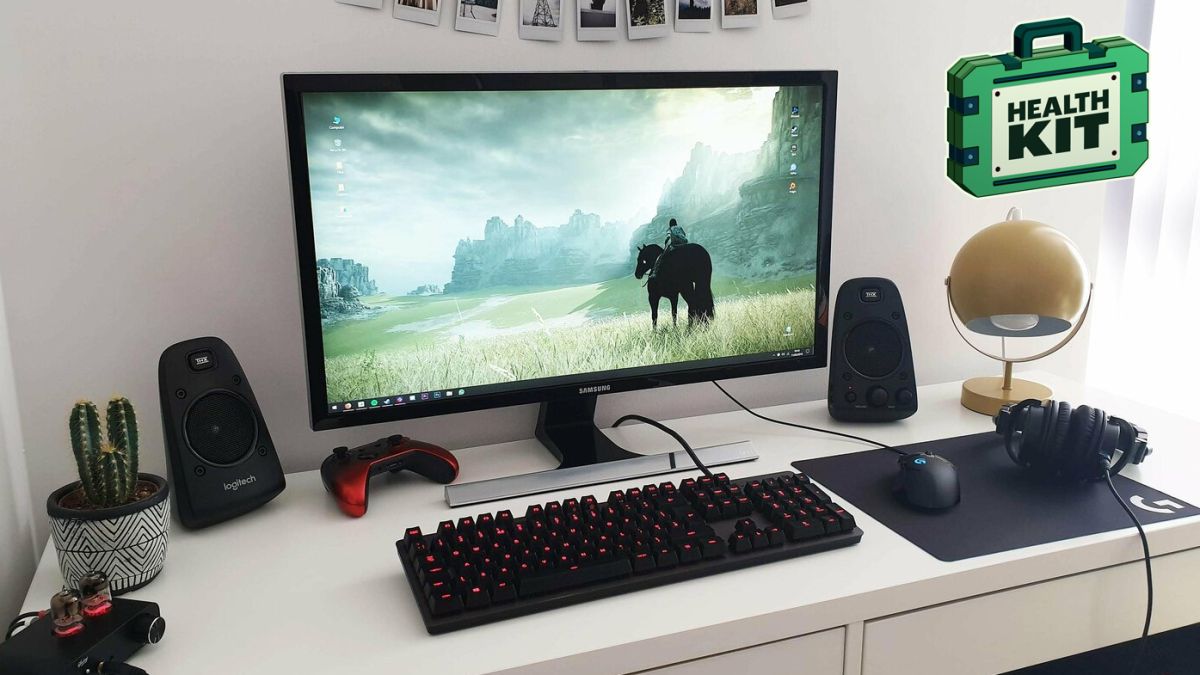
Personalize your gaming desk setup by adding accessories such as a gaming mat, gaming figurines, and other decorative items. This will make your gaming setup unique and reflect your personal style.
Setting up your gaming desk can be overwhelming, but with the right guidance, you can create the perfect gaming setup that fits your needs and budget. Consider the tips mentioned above and personalize your gaming setup to make it unique.
FAQs
- Do I need a specific type of desk for gaming?
- No, any desk that fits your needs and budget can be used for gaming.
- Is a gaming chair necessary for a gaming setup?
- No, a comfortable chair is essential for long gaming sessions, but any chair that provides good back support can be used.
- How do I choose a gaming keyboard and mouse?
- Consider factors such as the type of keyboard (mechanical or membrane), wired or wireless, and customizable buttons and sensitivity settings for the mouse.
- Is cable management necessary for a gaming setup?
- Yes, cable management keeps your gaming setup organized and free from clutter, preventing tripping hazards and improving the overall aesthetic appeal.