Gboard’s toolbar is getting a major makeover
-
 Loading...
 - Ashanti Quaye
- 15 Feb 2023
- 69 Views
- 0 Like
- 0 Comment
Highlights include new quick access tools and a customizable voice button
Gboard is the default keyboard on many of the best Android phones, so when it gets new features, the entire Android ecosystem takes notice. Google has been working on revamping the shortcut toolbar in its popular keyboard for over a month now, and it appears that things are just about ready for prime time, as the redesign is now beginning to roll out to beta testers.
Before this update, you had to tap a three-dot menu icon near the top-right corner of the keyboard to customize the buttons that appeared in Gboard’s quick access toolbar. Now, this option has been moved to the left edge of the menu bar and replaced with a button showing four squares with rounded corners.
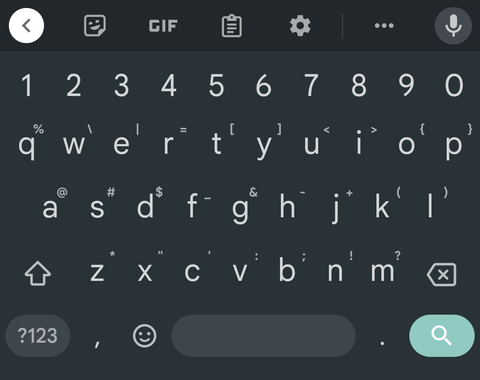
The most exciting new features show up once you tap the redesigned menu button. You’ll immediately notice an emoji option and a language switcher that weren’t there before. You can now drag the icons around to rearrange how they appear in this overflow menu, and you can still move items to and from the quick access toolbar to change which options appear when you first open the keyboard.
Another fun tweak is the fact that you can add as many shortcuts as you’d like to the quick access toolbar instead of being limited to just four. But perhaps the biggest change is with the voice search button — you can now drag any item into this slot to replace the microphone icon with a custom entry. Read More…