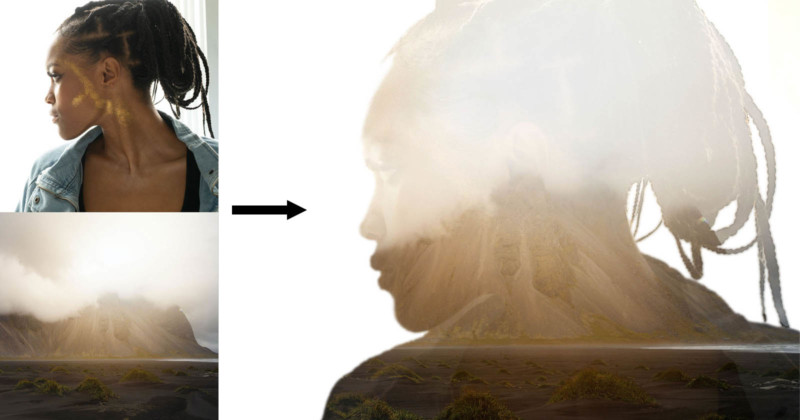
How to Make a Double Exposure Photo in Photoshop
-
 Loading...
 - Magdalena Pena
- 18 Oct 2022
- 81 Views
- 0 Like
- 0 Comment
In the past, double exposing film was one of the most popular special effects used in photography, and often could be hit or miss. The idea was to combine two (or more) photos into the same image.
In the days of film, this was done by taking two photos onto the same frame by shooting a second frame without advancing the film. Or, in the case of large format cameras, simply leave the film holder in place for a second shot.
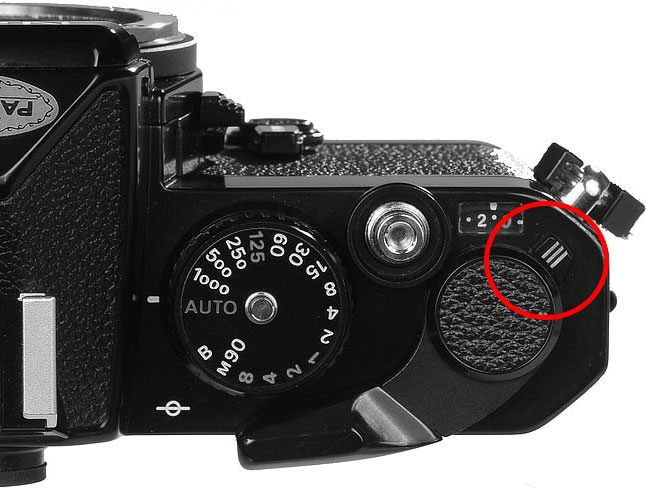
Many 35 mm film cameras could do this by using a special function to allow the shutter to be cocked without advancing the film (Figure 1). You could also do this on cameras not designed with this function by carefully holding the rewind knob steady, pressing the rewind release button, and then advancing the film lever.
Another way would be to hold the shutter open on “bulb” mode and simply remove and replace the lens cap. This method is really only useful in the studio or at night when long exposures were needed. As you can imagine, this and the previous methods all required a bit of experimentation and often required careful framing of the shots to be double-exposed. Read More...